The Predictive Text Suggestions feature on iPhone is designed to speed up your typing in Messages and other apps by coming up with word suggestions that you are most likely to type next.
These Predictive Word suggestions try to copy or resemble your writing style, as they are based on data collected from your past conversations.
If you feel that “Predictive Text Suggestions” are interfering with your thought flow or making you write in a particular way, you can easily fix this issue by disabling the Predictive Text Feature on your iPhone.
Disable Predictive Text on iPhone
If you are being bothered by suggestions during an online conversation, iPhone provides the option to temporarily switch-off or disable Predictive Text during that particular conversation.
If you do not like the idea of iPhone coming up with word suggestions, you can permanently disable the Predictive Text feature on your iPhone.
1. Temporarily Disable Predictive Text on iPhone
You can temporarily disable Predictive Text Suggestions on iPhone at any time by following the steps below.
1. Open the Messages App on your iPhone.
2. Open any Conversation and tap within the Message body to activate the virtual keyboard.
3. Once the Keyboard appears, start typing and you will see suggested words appearing in the grey bar above the first row of the keyboard.
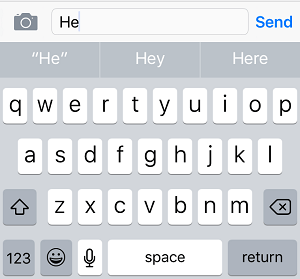
4. Tap and hold on one of the predictive text suggestions and drag it down towards the keyboard. For example, in above case, you can Tap and Hold on the suggested word Hey and drag it towards the first row of the keyboard.
5. Once the suggested word is dragged towards the keyboard, you should find the predictive text bar shrinking in size and appearing in the middle of the reduced Text bar.
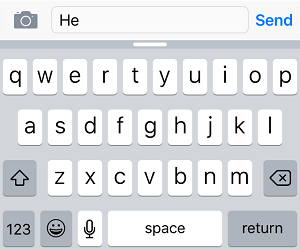
This will temporarily disable the Predictive Text feature on your iPhone and you will be able to continue typing, without being bothered by predictive text suggestions for the rest of your conversation.
At any time, you can activate Predictive Text on your iPhone by swiping the white bar upwards.
2. Permanently Disable Predictive Text on iPhone
You can completely disable the Predictive Text feature on your iPhone by following these steps.
1. Go to Settings > General > scroll down and tap on Keyboard.
2. On the next screen, scroll down to “All Keyboards” section move the toggle next to Predictive Text to OFF position.
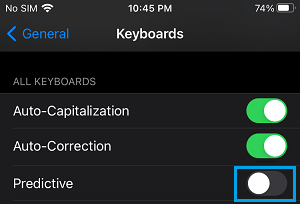
After this, you should no longer find iPhone bothering you with word suggestions, whenever you type in Messages and other Apps on your iPhone.