You may find the need to use Internet Explorer on a Windows 11 computer, if certain features on an Educational or a Government website can only be accessed by using Internet Explorer.
Since, Microsoft has totally removed Internet Explorer from Windows 11, the only way to use Internet Explorer on a Windows 11 computer is by setting up the default Microsoft Edge browser to open websites in Internet Explorer.
Use Internet Explorer in Windows 11
While Microsoft Edge browser can be set to open All websites in Internet Explorer, a reasonable approach would be to set Microsoft Edge to open only the incompatible sites in Internet Explorer.
This way, you will be able to access certain Educational and Government websites that still require Internet Explorer to fill forms or open back-dated webpages.
1. Make Microsoft Edge Open Websites in Internet Explorer
You can follow the steps below to make the Microsoft Edge browser on your computer to open only the incomptaible websites in Internet Explorer.
1. Open Microsoft Edge > click on 3-dots icon and select Settings in the drop-down menu.
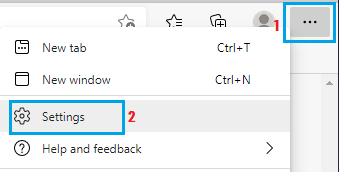
2. On the next screen, select Default Browser in the left-pane. In the right-pane, set “Let Internet Explorer Open Sites in Microsoft Edge” entry to Incompatible Sites only option.
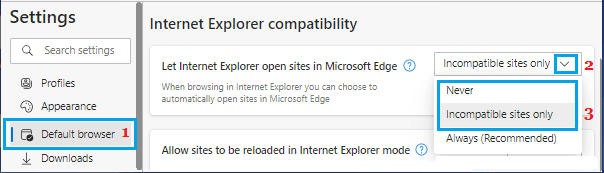
Incompatible Sites Only: Allows Microsoft Edge to open Educational & Government Websites in Internet Explorer, if they are not being fully accessed by Microsoft Edge.
Always: If you select the Always option, Microsoft Edge will open all websites in Internet Explorer.
2. Make Microsoft Edge Open Specific Websites in Internet Explorer
Another way to use Internet Explorer in Windows 11 is by adding the URL of the website that you want Microsoft Edge to open in Internet Explorer.
1. Open Mircosoft Edge > Click on 3-dots icon and select Settings in the drop-down menu.
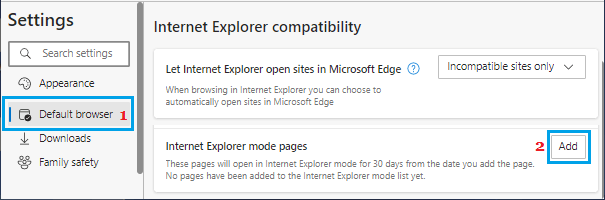
2. On the Settings screen, select Default Browser in the left-pane. In the right-pane, click on the Add button located next to Internet Explorer mode pages.
3. On the next screen, enter URL of the website that you want to open in Internet Explorer and click on the Add button.
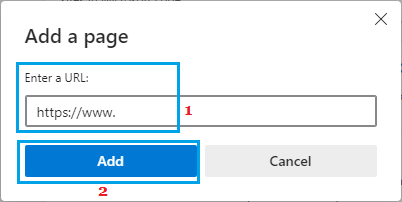
After this, Microsoft Edge will remember to use Internet Explorer, whenever you try to open this particular website on your computer for the next 30 days.