In the case of individual or person to person WhatsApp messages, you can check if your message has been read by taking a look at the “check” marks that appear next to the sent message. However, this method cannot be used to check if your message has been read by a specific person in a WhatsApp Group Chat.
In the case of WhatsApp Groups, the second blue check mark does not appear until the message has been read by all the Group Members, which prevents you from knowing whether your message has been read by the specific individual or group of individuals that the message was addressed or targeted to.
Find Who Has Read Your Message in WhatsApp Group
The good news! – WhatsApp does provide access to the list of members who have read your Message in a WhatsApp Group and this information is really easy to access.
You can find below the steps to find who has read your Message in WhatsApp Group on iPhone and Android.
1. Find Who Has Read Your Message in WhatsApp Group on iPhone
If you are using an iPhone, you can follow the steps below to find who has read your message in a WhatsApp Group.
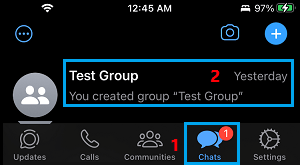
1. Open WhatsApp on your iPhone > tap on the Chats tab in bottom menu and open the Group Chat that you are interested in.
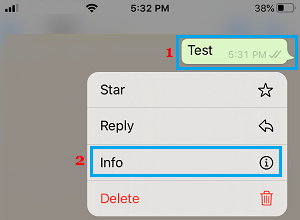
2. On the Group Chat screen, tap and hold on your Sent Message and tap on the Info option in the menu that appears.
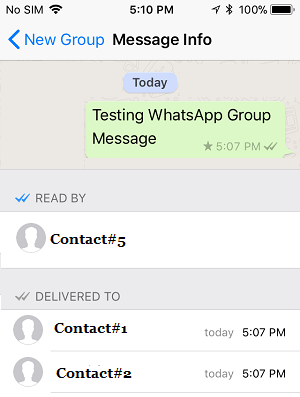
3. On Message info screen, those who have read your message will be listed under READ BY section and those who have not read your message will be listed under DELIVERED TO section.
Here is another way to check who has Read your WhatsApp group Message on iPhone.
1. Open the Group Chat > swipe left on the Message, photo or video that you had posted in the Group Chat.
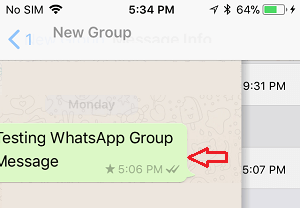
2. Swiping left on the Message will directly take you to message info screen, where you will be able to see who has read your message under Read By section.
Tip: You can Turn OFF Read Receipts in WhatsApp, if you do not want others to know that you have read their message.
2. Find Who Has Read Your Message in WhatsApp Group on Android Phone
If you are using an Android Phone, you can follow the steps below to find who has read your Message in a WhatsApp Group.
1. Open WhatsApp on your Android Phone.
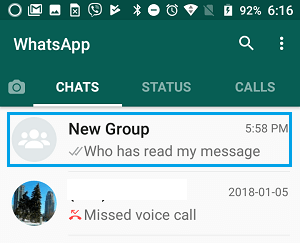
2. On the Chats screen, tap on the Group Chat that you are interested in.
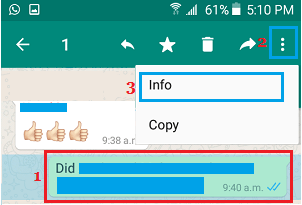
3. On the next screen, tap and hold on your Sent Message > tap on 3-dots menu icon > tap on Info.
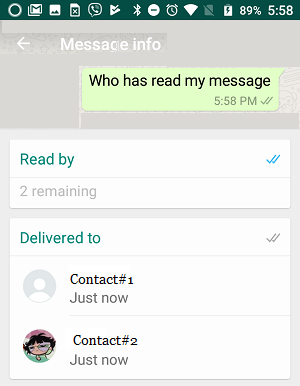
4. On message info screen, those who have read your Message will be listed under Read by section.
If you want to know who has seen your Photos or Video, tap and hold on the Photo or Video and tap on the Info icon.
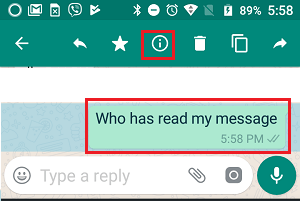
On the next screen, you will be able to see the names of Group Members that have seen your Photo.