While it is indeed possible to Call someone who is using “Do Not Disturb” on iPhone, you should try this only in case it becomes necessary to call the person due to an emergency or a valid reason.
The reason for this precaution is to prevent the possibility of this person being disturbed or distracted while driving, while attending an important meeting or not being in a mood to take your call. Hence, it is not a good idea to call someone who is using “Do Not Disturb” mode, unless the matter is urgent and it has become absolutely necessary to get in touch with this person.
For example, if you are worried about the safety and well-being of the person or if there is health crisis or a situation that demands getting in touch with this person.
Another valid reason would be in case you know for sure that the person that you are trying to call is forgetful and he/she may have forgotten to disable “Do Not Disturb” mode.
How to Find if Someone is Using Do Not Disturb?
In general, you can suspect that a person that you are trying to call is on “Do Not Disturb” mode, if you observe the following.
1. You hear a single ring and your Call is abruptly diverted to Voicemail.
This observation is based on our own testing where we tried to call an iPhone placed in “Do Not Disturb” mode. When we called the iPhone on DND Mode, we heard a single Ring and the Call was abruptly diverted to Voicemail.
The testing iPhone that was placed in DND Mode, did not Ring, Flash or display any signs of receiving an incoming Call.
2. Text Messages Appear as Delivered
Next, we sent a Text Message to an iPhone placed in “Do Not Disturb” mode. The Message went as normal, displaying the usual blue bubble with the status ’Delivered’ clearly appearing at the bottom of the text bubble.
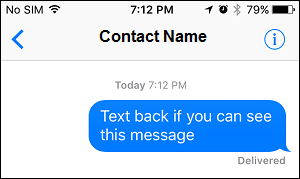
Again as expected, the iPhone that was placed in “Do Not Disturb” mode did not Ring, Vibrate, Flash or provide any indication of a new Message being received.
How to Call Someone Who is Using Do Not Disturb Mode?
The default “Do Not Disturb” Settings on iPhone have loopholes that have been included to make people accessible, even when iPhone is placed in “Do Not Disturb” mode.
Since, most iPhone users are likely to use “Do Not Disturb” with default settings, you should be able to call most people using one of the following methods.
1. Call Once and Call Again Within 3 minutes
The default “Do Not Disturb” setting allows Calls to go through if someone Calls Again from the same Phone Number within three minutes of the first Call.
The idea behind this default setting appears to be based on the reasoning that most people are less likely to call immediately for the second time, unless there is an emergency or an urgent need.
Using this knowledge, you should be able to bypass “Do Not Disturb” mode on most iPhones by Calling once and calling back a second time within 3 minutes of the first Call.
2. Call At A Different Time
If you observe that the person that you are trying to Call appears to be busy and not taking Calls during a fixed period of time, it is most likely that this person has set his/her iPhone to Automatically go into Do Not Disturb Mode during that period of time.
The best approach in such a case would be to figure out the “Do Not Disturb” period of this person and simply Call at a different time of the day.
As you will agree, there is no use calling someone who does not like to be disturbed during a certain period of the day.
You have more chances of conveying your Message or idea to people when they are willing to take Calls and provide you with the time and attention that you deserve.
3. Call From Different Number
The Do Not Disturb Mode has an option to Allow Calls from Favorite Contacts while disabling all other Calls.
In case the person that you are trying to reach is a close friend or relative of yours, it is quite possible that this person has only included your Home Phone Number as a favorite Contact and not your Work Phone Number.
Hence, try calling both from your Home and Work Phone to see if the Call goes through.
Another option would be to contact a person who you know is very close to this Contact of yours and try Calling from his/her Phone.
What If Someone Has blocked Your Number on iPhone?
It is possible that the person that you are trying to Call has accidentally or intentionally blocked your Phone Number on iPhone.
If this appears to be the case, you can refer to: Find If Someone Has Blocked Your Number on iPhone
Once you are convinced about your phone number being blocked, you may want to make use of tips mentioned in this article: How to Call Someone Who Has Blocked Your Number On iPhone.
Note: Please be aware that Calling someone who does not want to receive your Calls can land you in trouble.