The Serial Number of computer can be defined as a unique identifier; assigned by the manufacturer (OEM) to a specific device. It is typically stored in the BIOS/UEFI firmware of the computer and can be used to identify the device during manufacturing, inventory control, online support, service history and ordering parts.
- Tech Support: You will be asked to provide the Serial Number or Service Tag of the computer, when you contact when you contact manufactures like Dell, HP & Lenovo for online support.
- Warranty & Insurance: Serial Number of the computer is used to verify ownership of the computer and confirm that the computer is genuine and not counterfeit or stolen.
- Inventory & Quality Control: Manufacturers are known to use Serial numbers to track units during production, sales, quality control and management of inventory in the warehouse.
- Software Licensing Control: Serial Numbers are used by software providers to make sure that the use of software is limited or valid for a particular device.
- Repairs & Ordering Parts: Serial Number or Service Tag of the computer helps the vendors to identify the hardware configuration of the computer, when it is sent for repairs during warranty period.
Note: The Serial Number of the computer is not the same as Windows Product Key, IP Address or Mac Address.
Find the “Serial Number” of Windows Computer
In the case of a Laptop computers, the Serial Number should be available on a sticker attached to bottom of the device and in case of Desktop computers, the Serial Number should be available on a sticker attached to either top, side or back of the computer.
If the sticker (containing the Serial Number) attached to Laptop or Desktop computer has been removed or has become unreadable, you should be able to find the Serial Number by using Command Prompt or PowerShell in most cases.
If Command Prompt or PowerShell does not display “Serial Number”, the problem is usually due to this information not being entered by the manufacturer in the firmware (BIOS/UEFI) of the device or due to the computer being an assembled PC.
Related: How to Find Serial Number of Hard Drive in Windows 11/10
1. Find Serial Number Using Command Prompt
If your computer was manufactured by Dell, HP, ASUS, Acer or Lenovo, you should be able find its Serial Number by using the following steps.
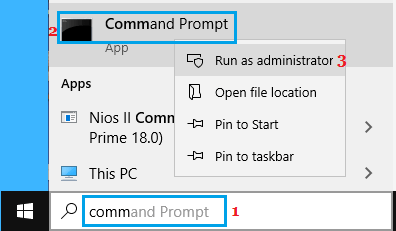
1. Type CMD in the Search bar > right-click on Command Prompt in the search results and select Run as Administrator option.
2. On the next screen, type powershell -NoProfile -Command “(Get-CimInstance Win32_BIOS).SerialNumber and press the Enter key on the keyboard of your computer.
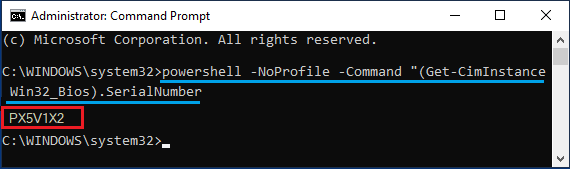
3. Once the command is executed, it will list the Serial Number of your computer under “IdentifyingNumber” entry on the Command Prompt screen.
2. Find Serial Number Using PowerShell
You can also make use of the following PowerShell script to find the Serial Number of practically any Windows computer.
1. Type PowerShell in the Search bar > right-click on Windows PowerShell in the search results and select Run as Administrator option.

2. On the PowerShell screen, type Get-CimInstance Win32_BIOS | Select-Object SerialNumber and press the Enter key on the keyboard of your computer.
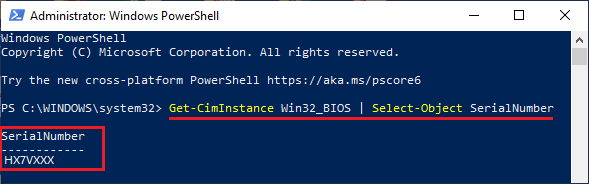
3. Once the command is executed, it will list the Serial Number of your computer below “Serialnumber” entry.
3. Find Serial Number of Assembled Computer
If you are using an assembled computer, you might be able to find the serial number of its motherboard by using the following steps.
1. Open Command Prompt as Admin.
2. On the next screen, type wmic baseboard get serialNumber and press the enter key on the keyboard of your computer.
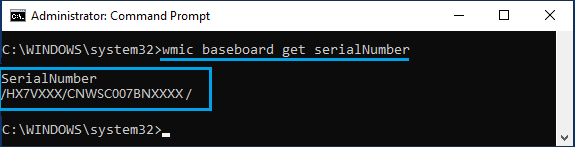
3. If the motherboard manufacturer had input the serial number information, this command will list the unique hardware serial number of the motherboard under “SerialNumber” entry on the Command Prompt screen.
4. Find Serial Number on Packaging
If you still have the cardboard box in which the Laptop or Desktop was bought or delivered, you should be able to find the Serial Number or Service Tag of the computer on a sticker attached to the box.
As mentioned above, the Serial Number may be listed as ‘Service Tag‘, SN#, SN or S/N, depending on the maker or manufacturer of the computer.
5. Find Serial Number on Email
If you had purchased the laptop or desktop computer online from Dell, HP or any other manufacturer, try to find Emails received from them.
If there is an Email containing the Receipt for your purchase, you should be able to find the Serial Number mentioned in the Email Receipt.
6. Find Serial Number on Registry/Warranty Documents
If you were provided with a warranty certificate or purchased an extended warranty, the serial number of the computer should be available on the warranty certificate.
Similarly, if you had registered the computer with the manufacturer, the Serial Number should be available on the registration document.
7. Check Battery Compartment and Case
If you have a laptop with removable battery, check its battery compartment. The Serial Number might be present on a sticker attached in the battery compartment.
In the case of desktop computers, the serial number of the computer can be usually found on a sticker attached inside the computer case.
8. Find Microsoft Serial Number on Surface Devices
In the case of Microsoft devices, the Serial Number is known as Microsoft Serial Number and it usually occurs in the form of a 12 digits long number.
If you do not have the original packaging or the sticker has become faded or damaged, you should be able to find the Microsoft Serial Number of your computer using the Surface App.
1. Open the Surface App and click on the Feedback button.
2. On the next screen (“Your Surface”), you will find the Microsoft Serial Number listed.
Tip: Check the bottom of Surface Keyboard, check the bottom/sides of Surface clipboard that attaches to the Keyboard. Also, flip out the kickstand and look for a string of numbers near its base.
Is Service Tag the Same as Serial Number?
In the case of computers manufactured by Dell, the 7-character alphanumeric “Service Tag” usually matches the “Serial Number” of the computer and this can be confirmed by executing wmic csproduct get identifyingnumber command as provided below in this guide.
However, other manufacturers like Asus, Acer, Lenovo, HP and Samsung stick to the term “Serial Number”, S/N or SN as the primary tracking identifier for their devices. The reason for this is due to the term “Service Tag” being protected by a trademark; which prevents direct competitors of Dell from using this term.