The default option in WhatsApp is to show Profile Picture to all Contacts, which is designed to make it easy for all your Contacts to identify you on the social media app.
However, WhatsApp also provides the option to hide your profile picture from everyone and the option to selectively hide your profile picture from certain selected or specific Contacts.
This can be useful, if you are posting family photos to WhatsApp Profile and do not want other Contacts, who are not a part of the family to see them.
Hide Profile Picture from Specific Contacts in WhatsApp
In general, people want to hide their WhatsApp Profile Picture for privacy, security, personal reasons and to maintain a distance between personal and professional or business life.
Hence, the default option in WhatsApp is to show profile picture only to Contacts, which prevents the profile picture from being seen by strangers or people that you do not know.
In addition to this, WhatsApp also provides the flexibility to hide profile picture from certain selected people from within your Contacts List.
1. Hide Profile Picture from Specific Contacts on iPhone
You can hide your profile picture or photo from being viewed by certain selected or specific Contacts on WhatsApp by following the steps below.
1. Open WhatsApp > tap on the Settings tab in bottom-menu.

2. From the Settings screen, navigate to Privacy > Profile Photo > select My Contacts Except…. option.
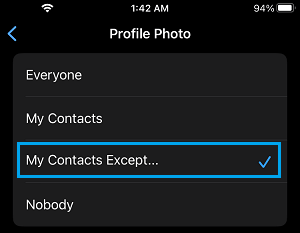
3. On the next screen, select the Contacts that you do not want to see your Profile Photo.
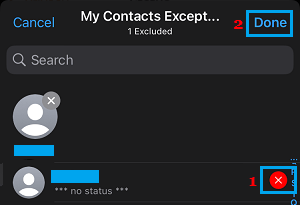
After this setting, your WhatsApp profile picture will be hidden from these selected Contacts.
2. Hide Profile Picture from Specific Contacts On Android Phone
The steps to hide profile picture from selected or specific Contacts in WhatsApp on an Android phone are practically the same as on iPhone.
1. Open WhatsApp > tap on 3-dots Menu icon (top-right corner) and select Settings in the drop-down menu.
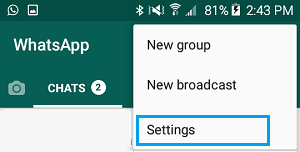
2. From the Settings screen, navigate to Privacy > Status > tap on My Contacts Except…. option.
3. On the next screen, select the Contacts that you want to hide your WhatsApp Profile Photo from.
After this, the Contacts that you selected on “My Contacts Except” screen won’t be able to see your Profile Photo in WhatsApp.