While the default setting in Windows is to clear the Recycle Bin every 30 days, it possible to prevent Files in the Recycle Bin from being automatically deleted by the computer.
When you prevent the computer from automatically clearing the Recycle Bin, deleted Files will remain available in the Recycle Bin, until they are manually deleted by the user.
The advantage of this setup is that it eliminates the possibility of accidentally or mistakenly deleted files from being cleared by the system, which increases your chances of recovering deleted files.
Prevent Recycle Bin Files from Being Deleted
The act of automatically clearing the Recycle Bin (every 30 days) is performed by Storage Sense, which is also responsible for performing Disk Cleanup and other optimization activities on the computer.
This provides you with two different methods to prevent files in the Recycle bin from being automatically deleted by the system.
- Prevent Storage Sense from Clearing Recycle Bin.
- Disable Storage Sense.
1. Prevent Storage Sense from Clearing Recycle Bin
You can follow the steps below to prevent “Storage Sense” from automatically clearing the Recycle Bin files on your computer.
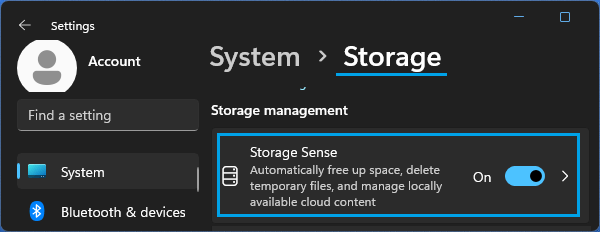
Windows 11: Go to Settings > System > Storage > scroll down and click on Storage Sense in the right-pane.
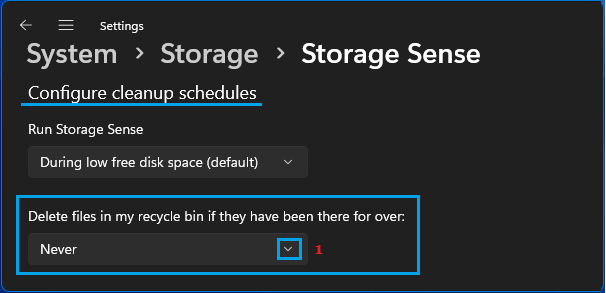
On the next screen, set Delete files in my recycle bin…. option to Never.
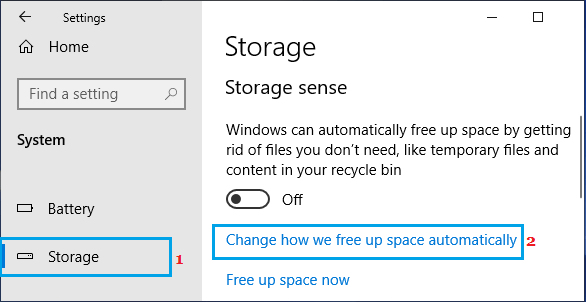
Windows 10: Go to Settings > System > Storage and click on Change how we free up space automatically option in the right-pane.
On the next screen, set Delete files in my recycle bin option to Never.
2. Disable Storage Sense
Another way to prevent Recycle Bin files from being automatically cleared by the system is by disabling or switching-off the Storage Sense feature on your computer.
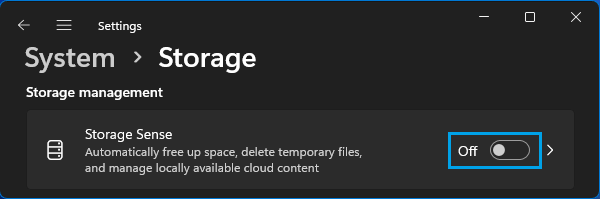
Windows 11: Go to Settings > System > Storage > move the slider next to Storage Sense to OFF position.
Windows 10: Go to Settings > System > Storage > move the toggle next to Storage Sense to OFF position.
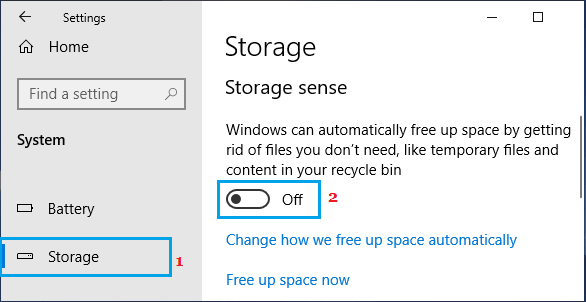
After this, any file that you delete on the computer should be available in the Recycle Bin.
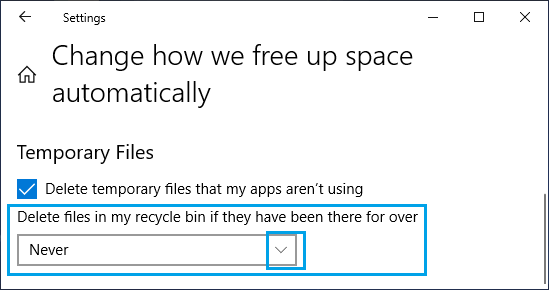
After this, Deleted Files will always be available in the Recycle Bin, until the Recycle Bin is manually cleared by the user.