When a computer becomes frozen and unresponsive, most users try to get out of the situation by pressing the “Escape” key and rebooting the computer, if repeatedly pressing the “Esc” key does not help.
While shutting down the computer and restarting it can help in bypassing the frozen screen, it can also lead loss of data; if you were very busy in the middle of a task and the work was not yet saved.
Hence, a better way to deal with a frozen computer is by using keyboard shortcuts that can fix the Frozen computer, without loss of data or the potential possibility of the open file being damaged or corrupted.
Fix Frozen Computer Using Keyboard Shortcuts
If you are dealing with the problem of a stuck or frozen computer, your first approach should be to give the computer sufficient time to complete its background activities.
If the computer still remains stuck or frozen and does not appear to be completing any background tasks or activities, you should be able to fix the computer by using the following keyboard shortcuts.
1. Press Win + Ctrl + Shift + B
If the problem is due to stuck graphics driver, pressing Win + Ctrl + Shift + B keys can fix the Frozen computer by restarting the Video Drivers.
Since, this keyboard shortcut only restarts graphic drivers, the program that you had left open will remain exactly as it was and you won’t be losing any of your work.
1. Press Win + Ctrl + Shift + B Keys on the keyboard of your computer
2. Within a moment, the screen of your computer will go black and you will hear a beep.
After a moment, you will see the display returning back to normal and you should be able to carry on with your work.
2. Press Alt + Tab
If your computer is frozen due to a stuck process, app or desktop program, pressing Alt + Tab keys can fix the stuck computer by switching you from the stuck program.
3. Press Ctrl + Shift + Esc
Pressing Ctrl + Shift + Esc keys provides access to the Task Manager, which can be used to switch OFF the unresponsive programs and processes.
1. Press Ctrl + Shift + Esc to open the Task Manager.
2. On the Task Manager screen, right-click on the unresponsive program and click on End Task.
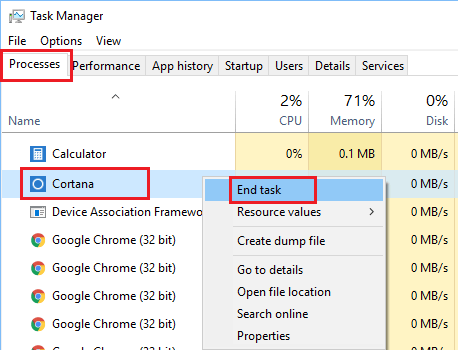
Closing the unresponsive Program should unfreeze the computer.
4. Press Ctrl + Alt + Del
Another keyboard shortcut that can bev used to fix a frozen computer is to press Ctrl + Alt + Del keys on the keyboard of your computer.
5. Reboot Frozen Computer
If you are unable to fix the frozen computer using above keyboard shortcuts, it is time to force-restart the computer.
1. Press and hold the Power Button, until the computer turns off.
2. Wait for 60 seconds and restart your computer by pressing the Power button.
3. If you are prompted to start the computer in Safe Mode or Start Windows Normally. Select, the option to Start Windows Normally.
As mentioned above, rebooting the computer will result in loss of data and you may end up losing all your unsaved work.
If the program that you were working has auto save feature, you might be able to recover your work up to the last auto-save point.