If your computer is coming up with “Print Spooler service is not running” error message, it is likely that you are trying to Install or Add the Printer to computer.
The same problem is also known to occur while users are trying to Print, in which case you may find the computer coming up with any of the following error messages.
- Print Spooler service failed to start
- RPC server is not available
- Print Spooler service is not running
Print Spooler Service is Not Running
In most cases, the problem of a Windows computer coming up with “Print Spooler Service is not running” message is due to the Print Spooler service being stuck or not being set to automatically start.
Hence, in most cases; this problem can be fixed by restarting the Print Spooler service and making sure that the Print Spooler Service is set to automatically start on the computer.
1. Restart Printer Spooler Service
Follow the steps below to Restart the Printer Spooler Service on your computer.
1. Press Windows + R keys on the keyboard of your computer.
2. Type services.msc and click on OK.
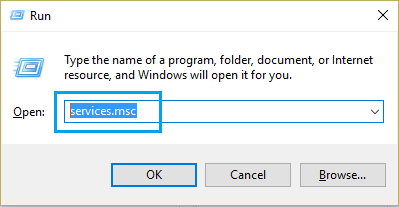
3. On the Services screen, right-click on Print Spooler and click on the Restart option.
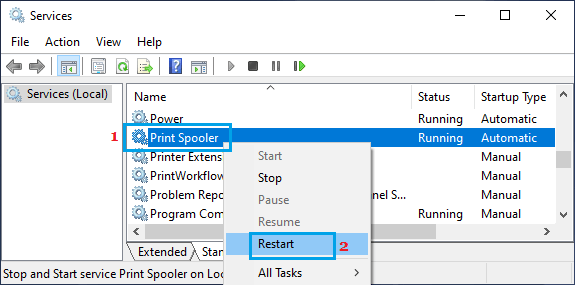
2. Set Print Spooler Service to Automatic
If the problem re-occurs, it is usually due to the Print Spooler Service not being set to automatically start on your computer.
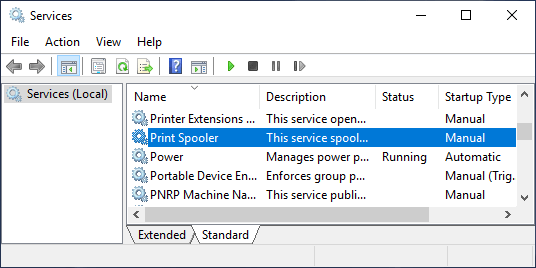
1. Press Windows + R keys > Type services.msc and click on OK.
2. On the Services screen, scroll down and double-click on the Printer Spooler service.
3. On the next screen, change the startup type to Automatic and click on Start (if the service status reads: Stopped).
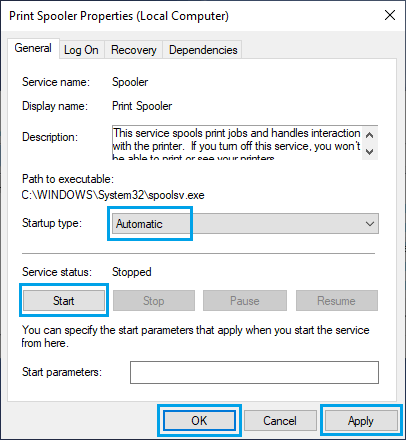
4. Click on Apply and OK to save this change to the Print Spooler service on your computer.
3. Update Printer Driver
Also make sure that the Printer Driver is up-to-date with the latest version.
1. Right-click on the Start button and click on Device Manager.
2. On the Device Manager screen, right-click on your Printer and click on Update Driver.
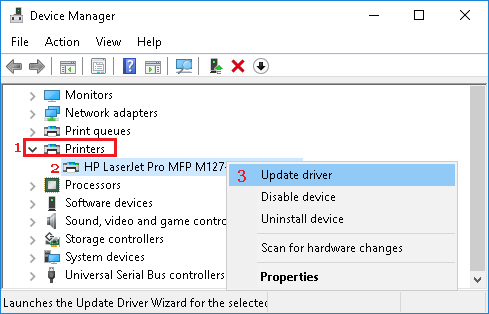
3. On the next screen, click on Search Automatically for updated driver software option.
4. Allow Windows to search for the updated printer driver and install it on your computer.