The “Backup and Restore Tool” as available in Windows can be used to Backup your computer to an External storage drive and also to Restore Back the data on your […]
Windows 10
How to Disable Microphone in Windows 11/10
Laptop computers come equipped with a built-in internal Microphone that allows you to make voice and video calls using Apps like Skype and Google Voice. However, there are users who […]
How to Disable Webcam In Windows 11/10
While the built-in camera on a Laptop computer allows you to make video calls and join online meetings, you may sometimes find the need to disable the webcam on your […]
How to Use Chromecast on Windows Computer
While you can project Computer Screen to TV using Miracast, you can also make use of Google’s Chromecast device to project media playing on your computer to the screen of […]
5 Ways to Find Printer IP Address in Windows 11/10
If you are looking for the IP Address of your printer, it is likely that you want to manually add the Printer to your computer using its static IP Address. […]
How to Disable Game DVR in Windows 10
The Game DVR feature in Windows 10 allows you to record Game Play and Capture screen shots while playing games on your PC. However, you may want to disable Game […]
How to Stop Skype from Running in Background
The default tendency in Microsoft Skype is to startup automatically with the computer and keep running in the background, always available and waiting to be used. While this setup is […]
Stop Skype from Starting Automatically in Windows 11/10
While the default setting in Windows is to allow Skype to automatically startup with the computer, it also provides the option to stop Skype from automatically starting up with the […]
How to Login to Router On Windows PC & Mac
If you are trying to Login to Router for the first time, it is likely that you want to change the Name and Password of your Home or Office Wi-Fi […]
How to Change Download Location in Internet Explorer
The default option in Internet Explorer is save all the downloaded files to the ‘Downloads Folder’ on your computer. However, it is also possible to change the Download Location in […]
How to Delete User Account In Windows 11/10
You may find the need to remove or delete User Account on your computer, if it has become corrupted or if you are dealing with the problem of unwanted or […]
How to Change User Name in Windows 11/10
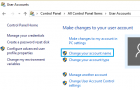
You can change the ‘User Name’ that you use to login to the computer, both for Local User Account and also for Microsoft User Account on your Windows computer. In […]