If you are thinking in terms of blocking a phone number, you might be interested in knowing as to what exactly happens; when you block someone’s phone number on iPhone.
This is important to know, considering the possibility of the other person finding out that you have intentionally blocked his/her phone number and other consequences that you may face.
What Happens When You Block Someone on iPhone
When you block someone on iPhone, the blocked person won’t be receiving any alert or notification about being blocked; which keeps things in the dark; until the blocked person finds the need to call or message you.
When the blocked person tries to call your phone number, the call makes a short ring or two on the senders device and goes directly to the voicemail. However, you won’t be hearing those short rings and your iPhone won’t be ringing or vibrating; when the blocked person calls your device and decides to leave a voice message.
If the blocked person tries to contact you by sending a text or imessage, the messages will appear as sent on the senders device. However, messages sent by the blocked person won’t be generating any notification, alert sound or appearing anywhere in the Messages app on your iPhone.
Note: If you are using WhatsApp, Signal or Telegram, the blocked person will be able reach you by using any of these Apps.
1. Can the Blocked Person Find Out
As mentioned above, the blocked person won’t be receiving any alert or notification, when the phone number is initially blocked and also when that person tries to call or message you.
However, the blocked person might be able to find out that you have blocked his/her phone number by taking a look at certain telltale signs as discussed in this guide: How to Find if Someone Has Blocked Your Phone Number.
2. How to Know When Blocked Person Calls You
Since, your iPhone won’t be ringing, vibrating or sending a notification when the blocked person makes a call to your device, the only way to find out that the blocked person has tried to call you is by taking a look at the “Call Logs” on your iPhone.
Calls that were blocked by iPhone will still appear in your “Recent Calls” list and they will be marked with a specific “Blocked” Icon; which makes it easy to identify them.
3. How to Access Voicemail Left By Blocked Callers
When someone calls your device using a blocked phone number, your iPhone will behave as if it has been switched OFF and the blocked caller will be immediately sent to the Voicemail
If the caller leaves a voicemail, the message left by the blocked caller won’t be available in regular voicemail messages. Voicemails from blocked callers are automatically segregated by iPhone from regular voicemails and stored under their own “Blocked Messages” entry.
You can access voicemails left by blocked callers on your iPhone by going to Phone App > Voicemail > scroll all the way down and tap on Blocked Messages.
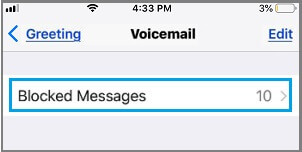
Since, the sender’s phone number has been blocked on your device, you won’t be able to call back or respond to the voicemail message in any way.
4. What Happens When Blocked Person Sends You Text Messages
When a blocked person sends you a Text or iMessage, it will be totally ignored by the Notification system and also by the Messaging App on your iPhone. This means, the message will not appear or show up anywhere in the Messaging App and you will not receive any notification, whenever this person sends you a text or imessage
Also, the blocked sender won’t be receiving any notification or message that his/her message has not reached you, due to the phone number being blocked.
5. What Happens When a Blocked Person Contacts You on FaceTime
When the blocked person tries to initiate a FaceTime call with you; the FaceTime call will just keep ringing on the Callers device, until the call is ended and the caller won’t be able to leave a video message.
However, nothing will happen on your device and you won’t be able to know that the blocked person is trying to call you on FaceTime.