If “System Tray” or Notification Area Icons” are missing from the Taskbar of your computer, you will find it difficult to gain quick access to certain commonly used functions like […]
How to Use Internet Explorer in Windows 11

You may find the need to use Internet Explorer on a Windows 11 computer, if certain features on an Educational or a Government website can only be accessed by using […]
Fix: MacBook Camera Not Working Issue
While the built-in Camera on a MacBook works flawlessly most of the times, it can also freeze-up, get disconnected and stop working with both native and third-party apps. When the […]
4 Ways to Disable Face ID on iPhone
While enabling the Face ID feature on iPhone can help in protecting the privacy of your Messages, Photos and prevent your Personal & Payment from being exposed, you may find […]
How to Set Up Reminders on iPhone

If you are like most users, it is likely that you have used the Reminders App to setup simple Time and Date based Reminders to make your iPhone Remind you […]
How to Hide Text Messages on iPhone
iPhone provides multiple ways to Hide Text Messages from others and prevent the possibility of your personal and confidential information from being compromised. In most cases, this can be done […]
How to Change Local Account to Admin in Windows 11/10
As you must have noticed, there is no option to create Admin Accounts in the Home Edition of Windows. Hence, the only way to add a Local Admin Account on […]
How to Change Microsoft Account Password
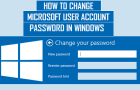
You may find the need to change Microsoft Account Password, if it appears unsafe or easy to guess and if you believe or suspect that it has been compromised. This […]
How to Remove Microsoft Account From Computer
If you do not want to use Microsoft Account, you can either convert the Microsoft Account to Local Account or remove the Microsoft Account from your computer. In order to remove […]
How to Open ZIP Files on Windows Computer
If you have received a zipped file in an email message or downloaded one from the internet, you must have already tried to open the ZIP File on your Windows […]
Mail Recipient Missing from Send to Menu in Windows 11/10
If the “Mail Recipient” option is missing from the “Send to” menu on your computer, you won’t be able to attach files to email messages being sent from the computer. […]
How to Disable Windows Defender in Windows 11/10

While Windows computers come with “Windows Defender” enabled by default, they also provide the option to disable Windows Defender Antivirus protection, if required for troubleshooting and other purposes. The safest […]